















 Mean Stack Development
 Vue JS Development
 Javascript Development
 React JS Development
 Angular JS Development
 Next JS development
 Java Development
 Python Development
 Django Development
 Cherrypy Development
 C# Development
 ASP.NET Development
 NodeJS Development
 Laravel Development
 CodeIgniter Development
 Zend Development
 Ruby on Rails Development
 CakePHP Development
 PHP Website Development
 Symfony Development
 Drupal Development
 Joomla Development
 Wordpress Development
 .NET Nuke Development
 Kentico
 Umbraco
 .NET MAUI Development
 Xamarin Application Development
 iOS Application Development
 Android Application Development
 Android Wear App Development
 Ionic Development
 iBeacon Application Development
 Universal Windows Platform (UWP)
 Kotlin Application Development
 Swift Application Development
 Flutter Application Development
 PWA Application Development
 Flutter Health Tech & Wearable App Development Company
 React Native Health Tech Wearable App Development
 Offshore Software Development
 Custom Application Development
 Front-End Development
 Full Stack Development
 AI & Machine Learning
 Custom CRM Solutions
 Flask Software Development
 Electron JS Development
 ChatGPT Development
 Telemedicine App Development
 Build Smart Telemedicine Platform
 Beauty & Salon App Solutions
 Hire Workato Experts
 Magento Development
 Magento 2.0 Development
 Magento Enterprise
 Shopping Cart Development
 Prestashop Development
 Shopify Development
 Open Cart Development
 WooCommerce Development
 BigCommerce Development
 NopCommerce Development
 Virto Commerce Development
 AspDotNetStorefront Development
 .NET Application Development
 Microsoft Dynamics CRM
 VB .NET Development
 Sharepoint Migration
 ASP.NET Core Development
 ASP.NET MVC Development
 AJAX Development
 Agile Development
 Microsoft Bot
 Microsoft Blazor
 Microsoft Azure Cognitive
 HTML 5
 UI/UX Design
 Graphic Design
 Adobe Photoshop
 XML Application Development
 Cloud Computing Solutions
 Azure Cloud App Development
 AWS Development
 Google Cloud Development
 Certified AWS IoT Services Developers
 DevOps Consulting & Development
 Kubernetes Consulting & Services
 SQL Programming Development
 MySQL Development
 MongoDB Development
 Big Data
 Robotic Process Automation
 Social Media Marketing
 Search Engine Optimization
 QA Testing
 Software Testing
 Software Security
 Maintenance And Support
 I.T. Consulting Services
 Business Intelligence
 YII Development
 Data Analysis
 Alexa Skills Development
 On Demand App for Mobile repairing services
 On Demand App for Car Service Booking
 On Demand App for Cleaning Services
 On Demand App for Pharmacy
 On Demand Dedicated Developers
 On Demand Lawyer App Development










 Nuki Smart Lock
 Salto Smart Lock
 TTlock Smart Lock
 NFC App Development
 Custom IOT Enabled Smart Lock
 Smart Locker Solutions
 Hospital Smart Lock Systems
 Hotel Smart Lock Systems
 Smart Home & Office Locks
 Smart Access for Schools & Colleges
 Unloc Smart Lock Integration
 Yale & August Smart Lock Integration
 Populife Smart Lock Integration
 Smart Lock Hardware Development
 Dairy IoT Solutions
 Agri IoT & AI Solutions
 Weather & Climate Solutions
 Water & Waste Management Solutions
 RaspBerry Pi
 Firmware Software Development
 ESP 32 Software Development
 Embedded Development
 Internet of Things
 Smart IoT Development
 IoT Sensor Integration & Development Solutions
 Smart IoT System Development for HVAC
 Tuya IoT App Development
 Particle IoT SDK
 IoT Development with AI
 Smart Pet GPS Tracker
 Dairy GPS Tracking Solutions
 GPS Fleet Management Software
 Car Rental & Subscription Solutions
 Car Buy & Sell Marketplace Development
 AI-Powered Car Wash App Development
 PCB Design & Fabrication
 IoT AC Automation
 AI–IoT Painting Solutions
 IoT Wearable Hardware & App Development
 HVAC Automation & AI Control Systems
 Smart Home IoT Engineering
 AI Embedded Systems
 AI Hardware Design Service
 Advanced IoT Hardware & Firmware Development
 Device Driver Development Services
 NXP i.MX RT Firmware & Hardware Services
 Microchip PIC & AVR Development
 Hire IoT Architects
 IoT Cloud & Infrastructure Solutions
 Infineon XMC / AURIX Development Services
 Matter & Thread IoT Services
 Native IoT Mobile App Development (BLE & Wi-Fi)
 Snapdragon IoT Firmware Development
 Renesas RA/RX Firmware Services
 Silicon Labs EFR32 Development Services
 Smart Wearable App Development
 Smart IoT Meters
 Smart Healthcare Wearable App Development
 Health Care Monitoring System
 Fitness Tracking App Development
 Smart Home Automation Apps
 nRF PCB Design
 ESP32 PCB Design
 Embedded Wearables Engineers
 Rental Property Management System
 Building Management System
 Smart Lighting Development
 Infineon Semiconductor Firmware Development Services
 Custom Camera Development: Hardware, Firmware & PCB Prototyping
 Smart Security Camera SDK
 Nordic Semiconductor SDK
 Infineon SDK
 Arduino SDK
 NFC Lock Integration
 Kerong Lock Integration
 IoT & AI Solutions for Manufacturing
 Smart Inventory & Logistics Solution
 Food & Beverage Industry Solutions
 Smart Hospitality Solutions
 Smart Property Management
 Custom Smart Home IOT SDK
 Smart IoT & AI in Healthcare
 AI-Powered Security Solutions
 Smart Home Safety & AI
 Veterinary Clinic Management (AI)
 Pet Care System (AI & IoT)
 Pet Training & Adoption (AI)
 Healthcare IoT Development
 Event Management Software
 Money Remittance App
 Money Lending App Development
 Utility and Bill Payment App
 IoT Mobile App Development (Flutter & React Native)
 AI & IoT Retail Solutions
 Smart EV App Development
 Smart Solar IoT & AI Solutions
 IoT-Based Energy Systems
 Smart Energy & Utilities Solutions
 6G Solutions
 IoT Security Solutions
 AI-Powered Lottery App Development
 AI-Sports Fitness Club Management
 Travel
 Real Estate
 Medical & Healthcare
 e-Learning
 Consumer Products
 Finance
 Automobile
 Media & Entertainment
 Billing Software
 Enterprise Resource Planning (ERP)
 Augumented & Virtual Reality
 Point of Sale(POS) Development
 Learning Management System
 EV Charging Solutions
 About Us
 Partners & Certifications
 Quality Assurance
 Our Clients & Testimonials
 Development Process
 Our Products
 Social Responsibility
 Work Ethics
 Vision & Mission
 Awards
 Live Project Demos
 Contact Us
 Case Studies
 Portfolio
 Blog
Blog
ESP32 Wi-Fi Connected but No Data? Detect and Recover It
An ESP32 can remain associated with an access point, retain its old IP address and report a believable RSSI while MQTT, HTTP and raw sockets stop moving data. Restarting the application protocol may do nothing, yet cycling the Wi-Fi interface restores service.
Developers often call this a zombie Wi-Fi state: the control plane says connected, but the data plane is effectively dead.
This is a descriptive term and thus not an ESP-IDF error, nor is it a result of a single cause. A variety of reasons could bring about similar issues, including expired sockets, DNS breakdown, lost routing, back-end failure, heap fragmentation, RF coexistence issues, or a problem with the driver or network stack.
This means that the main challenge for engineers is to identify the module that failed prior to taking any recovery measures.
Let's Work Together!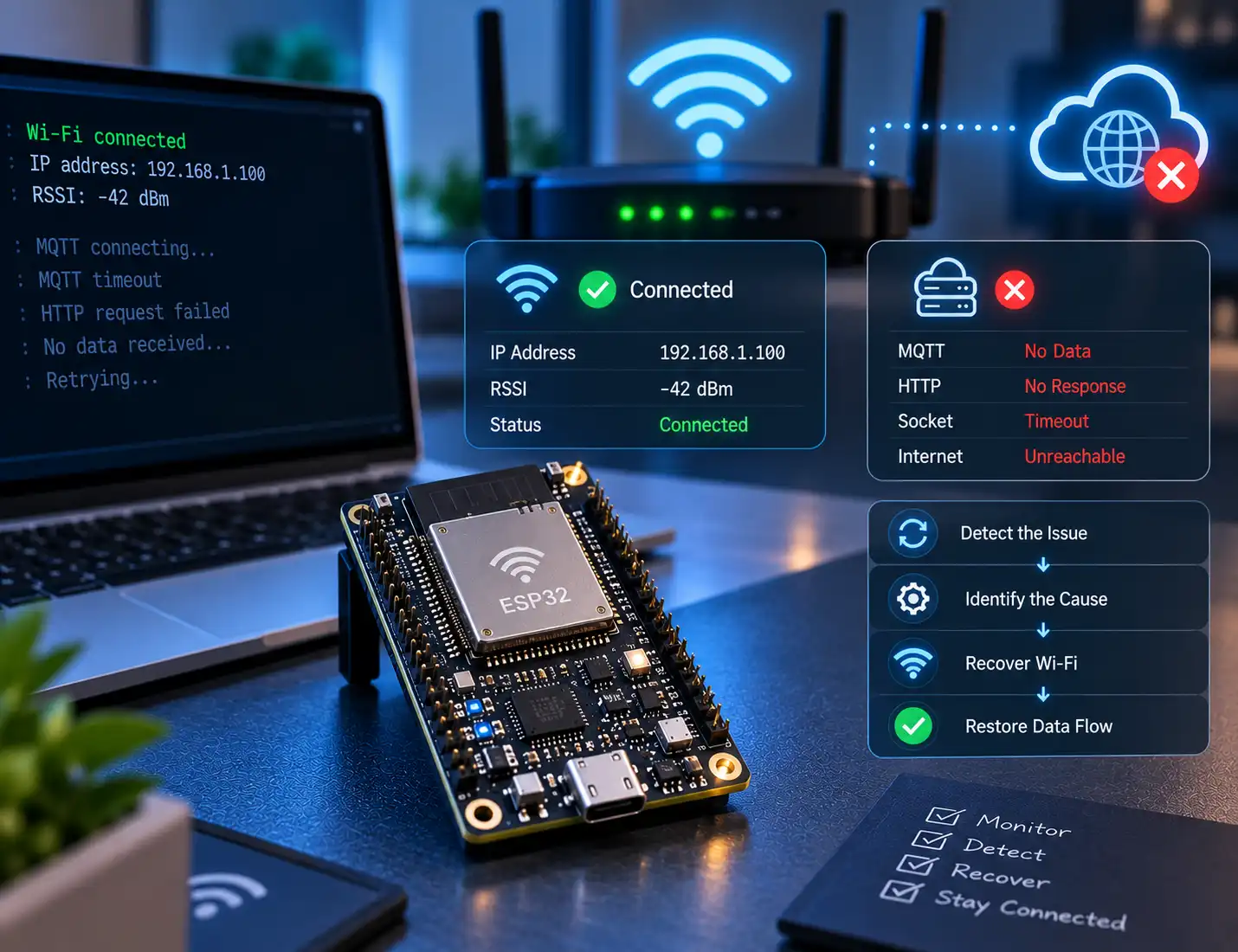
Why WL_CONNECTED is not enough
Connectivity is a chain. The radio must run, the station must associate, the interface must obtain IP, gateway and DNS settings, a route must work, a remote socket must open and the application protocol must receive a valid response.
WL_CONNECTED conveys only the lower levels of this chain. The fact that an IP address is available means that the settings are established; it does not signify that the latest data packets have passed, while RSSI only shows the amount of a signal received.
An Espressif issue opened in March 2025 reported Wi-Fi and BLE becoming unresponsive while the device still believed it was connected and held a valid IP. Restarting Wi-Fi recovered the unit. The issue is useful evidence that this symptom exists, but it does not prove that every connected-without-data failure has the same cause.
Build a four-layer health check
-
1
Association
Keep track of the current Wi-Fi state plus the most recent connection or disconnection event along with its reason.
-
2
Interface
Check the IP, gateway, and DNS configuration. Commence the LwIP socket work only after welcoming IP_EVENT_STA_GOT_IP.
-
3
Data plane
Perform hostname resolution and use a bounded TCP connection to access your endpoint. While we have found ICMP ping to be useful for diagnosis purposes, it might not be allowed by the network.
-
4
Application
Record the last useful acknowledgement which could be an MQTT message, authenticated HTTP health transaction, or valid encounter from your own protocol.
A production signal is generally strong when it comes from the infrastructure that the device relies on. It is not required to restart the fleet because of one or a couple of online services unavailability, but rather look for consecutive outages, wait until timeout ends, and use secondary services when applicable.
A safer approach to recovery ladder
-
1
Recreate application clients
Disconnect MQTT, HTTP, WebSocket or custom sockets, create new sessions and resend subscription whenever applicable.
-
2
Reconnect the station
Use WiFi.reconnect() for the Arduino or app-controlled esp_wifi_connect() of the ESP-IDF, applying a retry limit, backoff time and jitter.
-
3
Restart the WiFi interface
If association and IP appear as still valid but autonomous probes keep failing, disable clients, turn off Wi-Fi, reset to station mode, and reconnect.
-
4
Restart the device
The controlled reboot can be executed only when there is no success in recovery through the interfaces and only after preserving the reasons for the failure and important metrics.
Escalation is important. Anytime a device is rebooted after a failed request, downtime is confused with a fault in the device. Similarly, a reconnect approach that relies only on the disconnect event will do nothing when there are no events. For access control applications or medical or industrial devices, every reboot must also result in a product-specific safe state check.
Compact Arduino-ESP32 recovery pattern
The patterns below distinguish between link state and data plane health and keep credentials safe from a Wi-Fi session. Substitute the present example hosts with services in your operations and submit the lastHealthy parameter only after receiving an acknowledgment that is necessary for your product.
constexpr uint8_t FAIL_LIMIT = 3;
uint8_t failures = 0, radioRestarts = 0;

bool dataPlaneHealthy() {
    if (WiFi.status() != WL_CONNECTED || WiFi.localIP()[0] == 0)
        return false;

    WiFiClient client;
    bool ok = client.connect("health.example.com", 443, 2500);
    client.stop();
    return ok;  // Prefer a real application acknowledgement.
}

void recoverNetwork() {
    closeAndRecreateApplicationClients();

    if (WiFi.status() != WL_CONNECTED) {
        WiFi.reconnect();
        return;
    }

    if (radioRestarts++ < 2) {
        WiFi.disconnect(true, false); // radio off; keep credentials
        delay(250);
        WiFi.mode(WIFI_STA);
        WiFi.begin(WIFI_SSID, WIFI_PASSWORD);
        return;
    }

    persistRecoveryReason();
    ESP.restart();
}

void pollNetworkHealth() {
    if (dataPlaneHealthy()) { failures = 0; radioRestarts = 0; return; }
    if (++failures >= FAIL_LIMIT) { failures = 0; recoverNetwork(); }
}
The health check should be performed at a reasonable interval, but also have process some random jitter so that during an outage, the fleet does not end up reconnecting and opening TLS sessions at the same time. This example is a control-flow pattern rather than a generic timing policy – a battery sensor that delivers readings every hour cannot be treated in the same way as continuously monitored alarm.
Distinguish the failure before resetting anything
| Observation | Likely layer | First check |
|---|---|---|
| Disconnected event recorded | RF, authentication or AP | Reason code, RSSI history and AP logs |
| Connected but no usable IP | DHCP or interface | Lease, gateway, DNS and got-IP event |
| IP works; names fail | DNS | Configured DNS servers and bounded lookup |
| Other hosts work; one service fails | Backend, TLS or firewall | Service health, time, certificate and server logs |
| Multiple probes fail until Wi-Fi restarts | Interface, socket, driver or coexistence | Socket cleanup, heap metrics and version comparison |
Telemetry that makes the next failure diagnosable
Before the commencement of every recovery phase, document the firmware versions and framework versions used, as well as the chip model, uptime, reason for reset, latest Wi-Fi event, time of acquiring IP, last application acknowledgement, IP/gateway/DNS state, RSSI level, communication channel, recovery phase, and outcome, in addition to the amount of free heap, minimum ever heap, and largest free block recorded.
Focusing only on the total number of bytes may fail to capture hidden fragmentation preventing allocation of memory for a network or TLS.
Keep event callbacks short. Record the event or push a compact message to a queue, then perform reconnect or shutdown work from the application task. Authentication failure, no-AP-found, beacon timeout and an application-requested disconnect should not all enter the same high-frequency retry loop.
Test BLE coexistence and real fault conditions
Classic ESP32 devices utilize the same 2.4 GHz RF spectrum for Wi-Fi and Bluetooth. In cases where an application relies on BLE provisioning, scanning or a continuous BLE connection, let's assess the results of Wi-Fi operating only against simultaneous BLE advertising, scanning, connected BLE with MQTT, multiple router restarts affected by BLE use and poor signal authentication process.
A malfunction limited to a specific combination is much more informative than a vague field report.
A useful laboratory campaign should also remove the AP, block only the WAN route, break DNS, take down the primary backend, interrupt long-lived sockets, increase TLS/BLE memory pressure and run a multi-day soak with scheduled failures. Record detection time, the recovery stage that succeeded, heap trends, queued-data preservation and whether application clients resumed cleanly.
Common fixes that create new problems
Calling WiFi.begin() continuously creates connection churn and hides the event sequence. Rebooting after one timeout turns normal packet loss or backend maintenance into fleet instability. Erasing credentials during recovery converts a temporary outage into a provisioning failure. Maintaining sockets even after disconnection and change of IP address effectively leaves your application in a previous state even if the same IP returns. Disabling a power saving option or increasing the watchdog time without a rationale can mask the root cause of the failure by changing the symptoms. Planning a daily reboot will help to decrease the number of incidents, but will eliminate evidence, otherwise, logging is required so that further investigation can be undertaken.
Final recommendation
Stop asking only whether the ESP32 is connected to Wi-Fi. Ask whether the device can still complete the communication its job depends on.
Strong firmware includes Wi-Fi interactions along with full liveness checks, necessitates multiple proofs, rebuilds expired clients, and progresses from the station connection back to the interface reset and eventually the managed reboot. It also generates sufficient telemetry to identify an AP outage from a DNS problem, back-end issue, memory distress, and true failure of the network stack.
Official Sources